Examples Walkthrough
This document walks through each example script and notebook in dhb_xr, what it does, and how to run it.
Test results (summary)
Core example scripts were run from the repo root with PYTHONPATH=src python3 examples/<script>.py. Results:
| Example | Output |
|---|---|
frame_invariance.py |
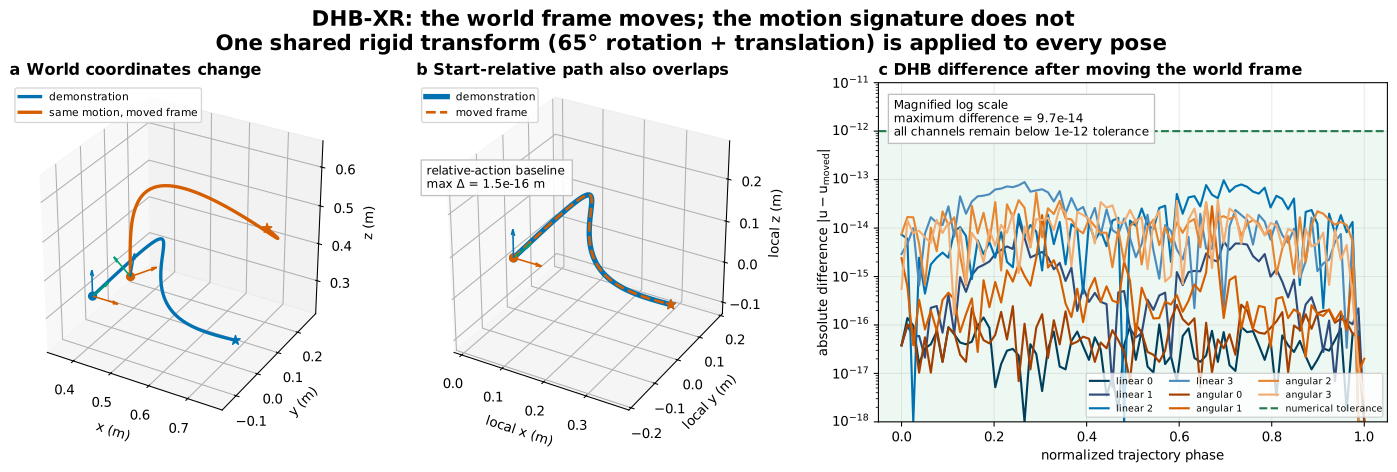
Three-panel check showing changed world coordinates and DHB residual below numerical tolerance |
basic_encoding.py |
Encoded invariants (52, 4), decoded positions (50, 3), quaternions (50, 4) |
trajectory_adaptation.py |
Adapted positions (28, 3), first/last pose printed |
dhb_qr_comparison.py |
DHB-DR linear (42, 4), DHB-QR linear (42, 5) |
gpu_batch_optimization.py |
Adapted positions (2, 30, 3), last poses per trajectory |
vla_tokenization.py |
Invariants (1, 42, 8), token indices (1, 42), reconstruction MSE printed |
motion_database.py |
Added 4 trajectories; top-3 retrieval with L2 distances and metadata |
imitation_learning.py |
Invariant matching loss, SE(3) geodesic loss, hybrid loss printed |
dhb_ti_time_invariant.py |
Progress totals (trans/angular/hybrid), resampled shapes, DHB-TI (DR/QR) invariant shapes |
Prerequisites
From the repo root:
cd /path/to/dhb_xr
pip install -e .   # or pip install -e ".[gpu,database]" for optional features
To run examples without installing (development):
export PYTHONPATH=src
python3 examples/basic_encoding.py
frame_invariance.py — The world frame moves; the motion signature does not
What it does: Creates one smooth 6-DoF trajectory, applies the same rigid rotation and translation to every pose, and encodes both versions using their own initial pose as the reference frame. It renders the technical check below and supplies the computed values used by the package overview on the documentation home page.
What to look for:
- The paths have different world coordinates.
- Expressing each path relative to its own first pose—the common relative-action baseline—makes the geometry overlap.
- All eight DHB-DR channels overlap to floating-point precision.
pixi run overview-example
# writes artifacts/dhb-xr-frame-invariance.svg
On the release fixture, the world-coordinate RMS change is 0.136 m, while the
maximum difference is about 1.5e-16 m in initial-frame position and 9.7e-14
across DHB channels. These values demonstrate frame invariance for this
controlled trajectory; they are not speed, task-success, or robot-safety
benchmarks. The residual panel deliberately magnifies floating-point differences
on a logarithmic scale; every channel remains below the declared 1e-12
numerical tolerance. “Frame-invariant” means corresponding values do not change
when the world frame moves—it does not mean a channel stays constant while the
motion itself evolves.
basic_encoding.py — Encode and decode a trajectory
What it does: Builds a short SE(3) trajectory (50 poses: positions + identity quaternions), encodes it to DHB-DR invariants, then decodes back to poses.
Concepts:
- Encode: encode_dhb_dr(positions, quaternions, ...) returns linear_motion_invariants (N-2, 4) and angular_motion_invariants (N-2, 4), plus initial_pose and frame info.
- Decode: decode_dhb_dr(linear_inv, angular_inv, initial_pose, ...) returns positions and quaternions (wxyz).
- With default padding, encoder output length is slightly longer than N-2; decoder drop_padded=True returns a pose sequence aligned with the original length convention.
Run:
python3 examples/basic_encoding.py
(52, 4) (for N=50 with padding), decoded positions/quaternions shapes (50, 3) and (50, 4).
trajectory_adaptation.py — Generate a boundary-adapted trajectory
What it does: Takes a demo trajectory, resamples it to a target length, and produces an adapted trajectory that starts at pose_target_init and ends near the requested final pose. The high-level generate_trajectory(...) API now prefers the FATROP backend when optional solver dependencies are installed.
Concepts:
- generate_trajectory(...) resamples the demo to traj_length, encodes the DHB invariants, and adapts the trajectory to the requested boundary poses.
- Use backend="auto" for the FATROP-first path, backend="fatrop" to require FATROP, backend="cusadi" for CusADi adaptation plus optional fixed-horizon decode, and backend="interpolation" for the deterministic resample/decode baseline.
- Fallback to slower IPOPT or interpolation is disabled by default. Set allow_fallback=True only for exploratory runs where continuing is more important than requiring the requested backend.
- Returns adapted_pos_data, adapted_quat_data, and resampled demo data.
Backend selection example:
from dhb_xr.optimization import generate_trajectory

result = generate_trajectory(
    pos_data,
    quat_data,
    pose_target_init=pose_target_init,
    pose_target_final=pose_target_final,
    traj_length=50,
    backend="auto",
)

cusadi_result = generate_trajectory(
    pos_data,
    quat_data,
    pose_target_init=pose_target_init,
    pose_target_final=pose_target_final,
    traj_length=50,
    backend="cusadi",
    cusadi_decode_horizon=50,
)
Run:
python3 examples/trajectory_adaptation.py
(28, 3) and printed first/last pose.
dhb_qr_comparison.py — DHB-DR vs DHB-QR
What it does: Encodes the same trajectory with DHB-DR (Euler) and DHB-QR (quaternion) and compares output shapes.
Concepts: - DHB-DR: 4 values per component (magnitude + 3 Euler angles). - DHB-QR: 5 values per component (magnitude + unit quaternion wxyz), avoiding gimbal lock and giving smooth quaternion-geodesic losses.
Run:
python3 examples/dhb_qr_comparison.py
(42, 4) (DR) and (42, 5) (QR).
gpu_batch_optimization.py — Batched trajectory optimization
What it does: Uses BatchedTrajectoryOptimizer to optimize invariants for two different start/goal pose pairs so that decoding matches the goal pose (scipy L-BFGS over invariant sequence).
Concepts: - One demo trajectory; two initial poses and two goal poses. - Optimizer minimizes a loss that decodes invariants from each init and penalizes distance of the decoded end pose to the goal (position + rotation). - Returns batched adapted positions and quaternions.
Run:
python3 examples/gpu_batch_optimization.py
(2, 30, 3) and last poses for each trajectory.
vla_tokenization.py — VQ-VAE tokenization (DHB-Token)
What it does: Encodes a trajectory to invariants, then runs it through the causal VQ-VAE tokenizer (DHBTokenizer) to get discrete token indices and a reconstruction.
Concepts:
- Invariants shape (T, 8) (linear 4 + angular 4).
- Tokenizer: causal encoder → VQ → decoder; output token indices (1, T) and reconstructed invariants (1, T, 8).
- Useful for VLA action representation: invariant sequence → tokens → autoregressive or streaming decode.
Run: Requires torch.
python3 examples/vla_tokenization.py
motion_database.py — Motion DB add and retrieve
What it does: Builds a small motion database by adding four trajectories (as positions + quaternions), then retrieves the top-3 closest trajectories to a query trajectory by L2 distance in invariant space.
Concepts:
- MotionDatabase: stores encoded invariants and optional metadata; add(positions, quaternions, metadata); retrieve(query_positions, query_quaternions, k=3).
- Similarity is L2 on flattened invariants (optional DTW via use_dtw=True).
Run:
python3 examples/motion_database.py
imitation_learning.py — Invariant and geodesic losses
What it does: Compares a “predicted” trajectory to a “demo” trajectory using: 1. Invariant matching loss: L2 (or quaternion-aware) between predicted and demo invariant sequences. 2. SE(3) geodesic loss: On the final pose (position + rotation). 3. Hybrid loss: Weighted combination of invariant and pose losses.
Concepts:
- invariant_matching_loss(U_pred, U_demo, method="dhb_dr")
- se3_geodesic_loss_np(pos_pred, quat_pred, pos_demo, quat_demo, beta=1.0)
- hybrid_invariant_pose_loss(..., alpha=0.5) for imitation / behavior cloning.
Run:
python3 examples/imitation_learning.py
dhb_ti_time_invariant.py — DHB-TI (time-invariant reparameterization)
What it does: Reparameterizes a trajectory by a geometric progress variable (translational arc-length, angular, or hybrid) and resamples at uniform progress knots so that invariants are approximately independent of execution speed and sampling rate. Then encodes with DHB-DR or DHB-QR.
Concepts:
- Progress variables: translation (s_{i+1} = s_i + ||Δp_i||), angular (θ_{i+1} = θ_i + ||Δr_i||), hybrid (σ_{i+1} = σ_i + α||Δp_i|| + (1-α)||Δr_i||).
- Uniform knots: σ_k = k Σ/(M-1); interpolate poses at σ_k (position spline, quaternion SLERP).
- encode_dhb_dr_ti, encode_dhb_qr_ti: resample by progress to M samples, then encode.
Run:
python3 examples/dhb_ti_time_invariant.py
benchmark_backends.py — Encode/decode timing
What it does: Times 50 encode and 50 decode calls for a trajectory of length 100 and reports average milliseconds per call (numpy backend).
Run:
python3 examples/benchmark_backends.py
Running notebooks with pixi
From the repo root, use the pixi environment (dev feature includes Jupyter):
cd /path/to/dhb_xr
pixi install          # installs deps including jupyter, ipykernel
pixi run notebook     # editable install + launch Jupyter in notebooks/
Then open demo_dhb_features_and_use_cases.ipynb (or any notebook) in the browser. The kernel uses the pixi environment, so dhb_xr is importable after the editable install.
Alternatively, start a shell and run Jupyter manually:
pixi shell
pip install -e .      # so `import dhb_xr` works
jupyter notebook notebooks/
Notebooks
- demo_dhb_features_and_use_cases.ipynb: Comprehensive demo (inspired by MATLAB Live Scripts): 6-DOF trajectory construction, encode/decode, SE(3) invariance, DHB-DR vs DHB-QR, DHB-TI (time-invariant), trajectory adaptation, and optional VLA tokenization — with elaborate markdown descriptions and plots (3D trajectories, invariant time series). Best starting point for understanding features and use-cases.
- tutorial_dhb_basics.ipynb: Encode → decode and print shapes (same idea as
basic_encoding.py). - tutorial_invariance_demo.ipynb: Apply a random SE(3) to a trajectory, encode both; shows that invariant magnitudes (first column) match.
- tutorial_vla_integration.ipynb: Encode trajectory to invariants, run through
DHBTokenizer, show token indices and reconstructed shape.
Open in Jupyter:
jupyter notebook notebooks/
Integration Examples (LIBERO / RoboCASA)
Located in examples/integration/, these scripts demonstrate DHB-XR with VLA benchmarks.
test_libero_adapter.py — Load LIBERO datasets
What it does: Tests the LiberoAdapter for loading LIBERO HDF5 datasets.
Prerequisites: Download LIBERO-Spatial dataset:
mkdir -p ~/Projects/data/libero && cd ~/Projects/data/libero
wget -O libero_spatial.zip "https://utexas.box.com/shared/static/04k94hyizn4huhbv5sz4ev9p2h1p6s7f.zip"
unzip libero_spatial.zip
Run:
pixi run python examples/integration/test_libero_adapter.py
test_libero_encoding.py — DHB encoding on LIBERO data
What it does: Loads LIBERO demos and encodes them with DHB-DR.
Run:
pixi run python examples/integration/test_libero_encoding.py
test_libero_retrieval.py — Motion retrieval across tasks
What it does: Builds a motion database from 5 LIBERO tasks and queries similar motions using DTW.
Run:
pixi run python examples/integration/test_libero_retrieval.py
libero_simulation_demo.py — Basic LIBERO demo
What it does: Demonstrates DHB encoding/decoding with LIBERO. If LIBERO is installed, runs the demo in simulation.
Run (without LIBERO installed):
pixi run python examples/integration/libero_simulation_demo.py
libero_full_demo.py — Complete LIBERO integration demo
What it does: Comprehensive demo showing: 1. DHB encoding/decoding on real LIBERO data 2. Trajectory adaptation (retargeting to new poses) 3. Full simulation with LIBERO environment 4. Motion retrieval across tasks
Run modes:
# DHB-only mode (no simulation dependencies required)
pixi run python examples/integration/libero_full_demo.py --dhb-only

# Motion retrieval demo
pixi run python examples/integration/libero_full_demo.py --retrieval

# Full simulation (requires libero conda environment)
~/miniforge3/bin/mamba run -n libero python examples/integration/libero_full_demo.py

# With OpenCV display (requires X11 display, press 'q' to quit)
~/miniforge3/bin/mamba run -n libero python examples/integration/libero_full_demo.py --render

# Save video for later viewing (works headless)
~/miniforge3/bin/mamba run -n libero python examples/integration/libero_full_demo.py --save-video demo.mp4

# Both display and save video
~/miniforge3/bin/mamba run -n libero python examples/integration/libero_full_demo.py --render --save-video demo.mp4
Expected output:
- DHB-only: Encoding shape (100, 4), reconstruction error ~0.000 mm, trajectory adaptation demo, plot saved to /tmp/dhb_demo_plot.png
- Simulation: Task completion at step 78 (varies by task)
- Retrieval: Top-5 matches with distances showing similar task structures grouped together
- Video: 3-4 second MP4 showing the robot executing the pick-and-place task
Visualizations: - DHB-only mode saves a matplotlib plot showing 3D trajectories (original vs adapted) and invariant magnitudes - Full simulation mode can display live OpenCV window or save video
libero_pro_dhb_demo.py — LIBERO-PRO Perturbation Robustness Demo
What it does: Demonstrates how DHB's SE(3)-invariance enables robust trajectory adaptation under LIBERO-PRO's various perturbation types. Shows that:
- DHB invariants are perfectly frame-independent (0.000 mm shape error under any spatial perturbation)
- The same motion in perturbed environments (different objects) yields highly correlated invariants (>0.97)
- Trajectory adaptation to new starting poses preserves original motion geometry
Run modes:
# Perturbation analysis (fast, no simulation required)
# Encodes demo, applies spatial perturbations, generates 6-panel analysis plot
pixi run python examples/integration/libero_pro_dhb_demo.py --analysis

# Batch evaluation across tasks (generates comparison plots)
pixi run python examples/integration/libero_pro_dhb_demo.py --batch

# Full simulation with LIBERO-PRO variants (requires libero conda environment)
~/miniforge3/bin/mamba run -n libero python examples/integration/libero_pro_dhb_demo.py --simulate

# Save side-by-side comparison video (original vs perturbed variants)
~/miniforge3/bin/mamba run -n libero python examples/integration/libero_pro_dhb_demo.py --simulate --save-video comparison.mp4

# Specific task
~/miniforge3/bin/mamba run -n libero python examples/integration/libero_pro_dhb_demo.py --simulate --task_id 3
Expected output (analysis mode):
- Reconstruction error: 0.000 mm
- Shape preservation under perturbation: 0.000 mm for all offset levels (20mm, 50mm, 100mm)
- Cross-demo invariant consistency: CV ~40% (expected variation across different demonstrations of the same task)
- Plot saved to: /tmp/dhb_pro_perturbation_analysis.png
Expected output (simulation mode):
- Original trajectory replay with recorded EE positions
- Adapted trajectories with different starting offsets (shape preserved)
- LIBERO-PRO variant execution with invariant correlation (>0.97)
- Comparison image: /tmp/dhb_pro_simulation_comparison.png
- Invariant comparison: /tmp/dhb_pro_invariant_comparison.png
Key insight: Unchanged world-frame replay remains tied to the recorded coordinates. DHB encodes motion geometry separately from its world-frame anchor, so the package can re-decode or retarget it from a new pose. A correctly constructed initial-frame relative action chunk also removes the shared world transform and is the appropriate VLA baseline for future policy comparisons.
libero_swap_demo.py — DHB-XR vs Naive Replay under Spatial Swap
What it does: Compares unchanged replay with a solver-adapted trajectory when LIBERO-PRO swaps object positions by about 17 cm. It measures whether the end effector remains near the old target or moves closer to the new one.
Why this matters for VLA: It isolates the limitation of world-frame replay and demonstrates the package's geometric adaptation path. It does not compare against a learned VLA or an initial-frame relative-action policy:
- Shared rigid frame changes leave both initial-frame relative actions and DHB invariants unchanged.
- DHB-XR additionally routes the representation through retargeting, retrieval, time normalization, tokenization, and checked execution tools.
- Whether that broader interface improves VLA task success or data efficiency requires a matched learned-policy evaluation.
Run:
# Requires LIBERO-PRO + Fatrop solver in the libero conda environment
~/miniforge3/bin/mamba run -n libero python examples/integration/libero_swap_demo.py
Expected output:
- Original demo: SUCCESS (robot picks up bowl, places on plate)
- Naive replay in swapped env: FAILS (robot reaches for old plate position, 11.1cm from new plate)
- DHB-adapted in swapped env: Robot moves towards new plate position (4.6cm from new plate)
- Improvement: 6.5cm closer to correct target with DHB adaptation
- Plot saved to: /tmp/dhb_swap_comparison.png (8-panel comparison)
- Video saved to: /tmp/dhb_swap_comparison.mp4 (side-by-side)
Note on action space: LIBERO uses OSC velocity commands. The demo uses a simplified action bias to illustrate DHB's geometric intent. In a production VLA system, DHB-XR would be integrated at the trajectory planning level (before the controller), not as a post-hoc action modifier.
Running all examples
cd /path/to/dhb_xr
export PYTHONPATH=src
for f in examples/basic_encoding.py examples/trajectory_adaptation.py examples/dhb_qr_comparison.py examples/gpu_batch_optimization.py examples/vla_tokenization.py examples/motion_database.py examples/imitation_learning.py examples/dhb_ti_time_invariant.py; do echo "=== $f ==="; python3 "$f"; done